
Song Forms & Tempo
Understanding the architecture of a track and the heartbeat that drives it. We are moving from single-loop production into full-scale arrangement.
The Blueprint & The Heartbeat
Bridging artistic vision with scientific precision in Logic Pro.
Art: Song Forms
AABA (The 32-Bar Form)
The standard for the Great American Songbook and early Pop. It relies on a “Statement (A), Repeat (A), Departure (B), and Resolution (A)” structure.
Verse / Chorus / Bridge
The main elements of modern popular music. The Verse tells the story, the Chorus is the emotional peak (the Hook), and the Bridge offers a final contrast to prevent ear fatigue. Of course there are other elements of a song, like solos and breaks, and of course rules are meant to be broken!
The Drop
Essential in EDM and Hip-Hop. The Drop replaces a melodic chorus with a sudden shift in energy, texture, and bass frequency.
Science: The Physics of Time
Tempo & BPM
Beats Per Minute defines the physical energy. 60-80 BPM (Slow/Mood), 120-128 BPM (Dance/Movement).
Time Signature
The 4/4 “Common Time” grid vs. the 3/4 Waltz or 6/8 compound feels. The top number specifies the number of beats per measure, and the bottom specifies the type of note that equals one beat (4 = quarter note, 8 = 8th note).
Click vs. Feel
A “Click” (metronome) is mathematical perfection. “Feel” (Swing/Groove) is the human element—deliberately playing behind or ahead of that grid to create a ‘pocket’. A good musician knows how to play “with” a click rather than “to” a click.
Weekly Assignment
Goal: Reverse-Engineering Professional Arrangements
Create a Blank Project
Create a Blank Logic Project and Save it as “Your name”_”Song and artist name”_Lesson8
Adapt Project Tempo
Go to File / Project Settings / Smart Tempo… Under “Project Tempo Mode” – select “Adapt Project Tempo”. This will align the project grid to the song.
Import a Song
Import your favorite professional song into a blank Logic project.(Let me know what song you would like to use and I will send it to you).Because you set Logic to Adapt Project Tempo, Logic will create a tempo map of the song.
Select Global Tracks
Open Global Tracks (G). Hit optionG. Select Arrangement, Tempo, Signature and Chord Track.
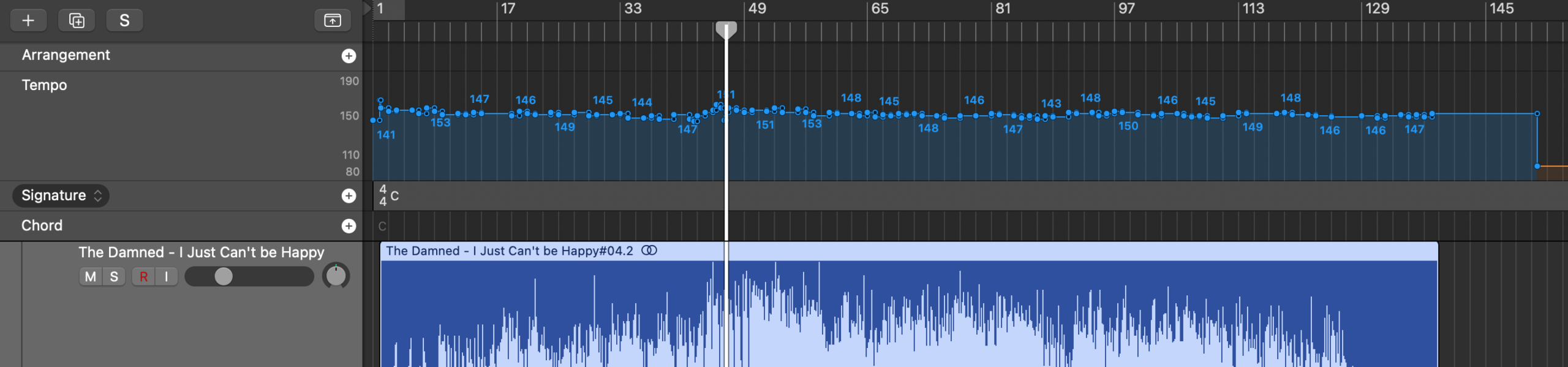
Map the Sections
Map the sections (Intro, Verse, etc.) using the Arrangement Track, by hitting the plus sign to the right of “Arrangement”
Create Some Markers
Note the exact Bar/Beat locations of the most important moments.Hit optionG. Select “Marker”. Create Markers and label them.
Fun With Stems!
Hold down control and click anywhere inside the waveform of the track. Select “Processing” and “Stem Splitter”. Select all the choices and hit “Apply”. You will now have the song separated into isolated parts. You can solo, or remix or do any changes you want. (The catch is that you can’t use any of these tracks in a commercial release because the recordings are protected by copyright).
Re-Arrange!
In this lesson you have learned about Smart Tempo to have Logic follow the tempo of a track, and you have learned about the Arrangement, Tempo and Marker Global Tracks and the Stem Splitter. Have fun re-arranging the song by moving Arrangement Tracks around!
Remember to SAVE!!!